Instagram DM Features 2025: A Guide to Key Tools
HyppeSocial October 26th, 2025 Instagram
Understanding the Importance of Instagram DM Features
As Instagram continues to prioritize direct connections, a strong understanding of the latest Instagram DM features is essential for effective communication in 2025. The platform has enhanced its private messaging tools, particularly with new drawing and sticker functions, reflecting a strategic move toward private sharing over public content. User behavior confirms this shift, with more content being shared through Direct Messages than ever before. Mastering these tools is crucial for building stronger connections and improving your overall engagement on the platform.
How to Use Drawing and Sticker Tools in DMs
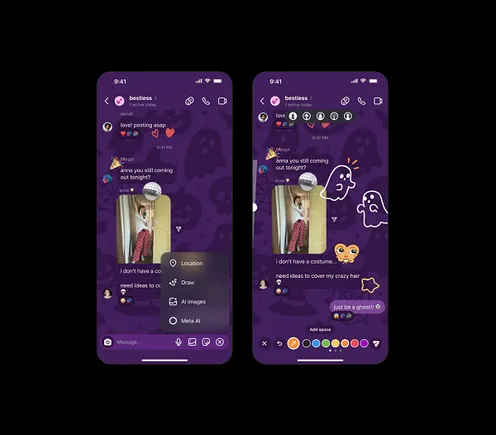
Adding a personal touch to your messages is straightforward with Instagram's built-in creative tools. These features are designed to make conversations more interactive and visually appealing. Follow these steps to use the drawing and sticker tools in your direct messages:
- Open an existing DM conversation within the Instagram app.
- Tap the '+' icon located to the right of the message input field to open the options menu.
- Select the 'Draw' option to activate the drawing interface over your chat screen.
- Choose from various pens, markers, and colors at the top of the screen to customize your brush size and style.
- Draw or write directly on the chat background, a shared photo, or over existing text. For example, you could circle a specific detail on a product image for a customer or add a handwritten note.
- You can also access your sticker library, which includes GIFs and custom avatars, to add another layer of personality to the conversation.
Why These DM Features Boost Engagement
These creative tools are more than just a novelty; they are part of a calculated effort by Instagram to encourage high-value interactions. In 2025, the platform's algorithm places significant weight on 'Sends'—the act of sharing content via DM. A 'Send' is considered a more meaningful engagement than a 'Like' or 'Comment'. By making DMs more interactive, Instagram encourages this valuable form of sharing.
- Build Personal Connections: Use drawing tools to personalize responses. A business can circle a feature on a product photo for a customer, or a creator can add a handwritten thank you note to a follower's message. This fosters loyalty.
- Create Shareable Content: Design content that encourages interaction within DMs. For example, post a 'fill-in-the-blank' graphic on your Story and ask followers to complete it and send it to their friends.
- Run Interactive Campaigns: Use DM features for marketing initiatives. You could host a contest where users submit customized screenshots of your product or run a Q&A session that encourages visual responses.
Streamline Communication with Saved Replies
For accounts that receive a high volume of messages, 'Saved Replies' is an essential tool for efficiency. This feature allows you to create and save message templates for frequently asked questions. By assigning a short keyword to each template, you can quickly populate a full response by simply typing the keyword. This is ideal for:
- Answering common questions about products, services, or hours.
- Providing consistent customer service responses.
- Managing collaboration requests with standard information.
Enhance Group Chats with Polls
Polls are an effective tool for making group chats more interactive and productive. This feature is one of the most useful Instagram DM features for gathering feedback and making decisions within a private group. Use them for:
- Making quick decisions on event plans or content ideas.
- Gathering audience feedback on products or services.
- Hosting fun quizzes to build community within a group.
Personalize Chats with Message Effects and Themes
Beyond drawing, Instagram offers other customization options to make chats more dynamic. These features improve the user experience and encourage more frequent interaction.
- Message Effects: Press and hold the send button to add special effects to a message, such as wrapping it in a gift box or adding confetti. This is useful for celebrations or important announcements.
- Chat Themes: Change the background color and theme of individual chats to match a specific mood, your brand's aesthetic, or the topic of conversation.
Optimizing Your Instagram DM Strategy for 2025
To make the most of direct messaging, integrate these features into a cohesive strategy. Start by organizing your inbox using the 'Primary' and 'General' tabs to prioritize messages. Consistently encourage DM interactions through calls-to-action in your public content, such as 'DM for more info' on a Reel. Finally, for business accounts, monitor your DM analytics to understand message volume and response times, which can help refine your communication approach. By mastering the full suite of Instagram DM features, you can significantly improve your audience relationships and overall impact.