Meta Edits App: New Features for Video Marketing
HyppeSocial November 27th, 2025 Instagram
New Video Editing Features to Enhance Your Social Content
For social media managers, creating high-quality video content efficiently is a constant priority. Video remains a top-performing format across social platforms, and having the right tools can significantly impact engagement and workflow. The Meta Edits app continues to evolve as a robust, integrated solution for creating compelling video, with recent updates introducing more sophisticated controls for marketers and creators. These new features provide practical ways to improve visual storytelling, audio clarity, and creative expression directly within the app.
The latest enhancements focus on giving users more granular control over their video projects. This includes advanced masking capabilities, automated audio adjustments, and timely creative assets like themed fonts. By integrating these professional-grade features, the platform aims to streamline the content creation process, removing the need for third-party editing software for many common tasks. Let's explore these new tools and how they can be applied to your social media strategy.
Advanced Masking Controls for Dynamic Visuals
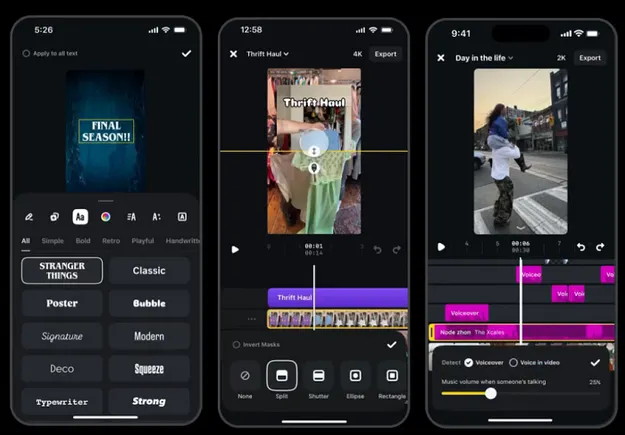
One of the most significant updates is the expansion of masking tools. Masking allows you to layer clips and images, selectively revealing or hiding parts of a video to create sophisticated effects. The Meta Edits app now allows users to animate mask shapes and properties, opening up a range of creative possibilities that were previously difficult to achieve without desktop editing software.
This feature is more than just a novelty; it has direct practical applications for marketing content. For example, you can use an animated mask to:
- Create a dynamic reveal: Introduce a new product by having a shape wipe across the screen to reveal it. A fitness brand could use a circular mask that expands to show a new piece of workout gear in action.
- Build a spotlight effect: Animate a mask to follow a specific person or object in the frame, drawing the viewer's attention exactly where you want it. This is useful for tutorials or product demonstrations where you need to highlight a key feature.
- Design custom transitions: Move beyond standard cuts and fades by creating unique, branded transitions between scenes. A real estate agent could use a house-shaped mask to transition from an exterior shot to an interior tour.
Experimenting with these masking options can elevate the production value of your videos, making them more engaging and professional without complicating your workflow.
How to Use Volume Ducking in Meta Edits App
Clear audio is critical for video success, especially for content that relies on voiceovers, testimonials, or tutorials. A common challenge is balancing background music with spoken audio. The new "volume ducking" feature directly addresses this problem. When the app detects someone speaking in a clip, it can automatically lower the volume of the background music, ensuring the voiceover remains clear and audible.
This automated adjustment saves considerable time in post-production. Previously, creators had to manually adjust audio levels throughout a clip, which can be a tedious process. Now, with a simple selection, the app handles the mixing for you. This is particularly useful for:
- Educational Content: Ensure your instructions in a DIY or tutorial video are not lost behind an overpowering music track.
- Behind-the-Scenes Footage: Let your audience hear your team's commentary clearly as you showcase your company culture or production process.
- Q&A and Interview Segments: Maintain a professional audio balance when featuring expert interviews or answering audience questions.
By ensuring your message is heard, volume ducking helps improve comprehension and accessibility, making your content more effective.
Leveraging Timely Trends with Themed Content
Staying relevant is key in social media, and tapping into pop culture moments can be a powerful way to connect with your audience. The latest update includes a new font inspired by the popular Netflix series 'Stranger Things', timed with the release of its final season. While it may seem like a minor addition, it provides a simple tool for creating timely, themed content that can capture audience attention.
Brands can use this font to create promotions that feel current and culturally aware. For instance, a local bookstore could promote its science-fiction section using the font in its Reels, or a retro-themed cafe could design a limited-time menu with a design that pays homage to the show. This type of reactive marketing shows that your brand is in touch with popular trends, which can increase shareability and engagement, especially around major cultural events like a show's season premiere.
Why Integrated Editing Tools Matter for Marketers
The continuous improvement of the Meta Edits app highlights a broader trend: the importance of integrated creative tools. For social media marketers, using a built-in editor offers several distinct advantages. It streamlines the creation process, reducing the time spent exporting from one app and importing into another. It also ensures that the final video is perfectly optimized for the platform's specifications, avoiding potential compression issues or formatting errors.
Furthermore, these integrated tools often provide exclusive access to trending audio, stickers, and effects that are popular on the platform. By utilizing these native features, your content is more likely to align with current viewing habits and algorithmic preferences. For any team looking to produce a higher volume of quality video content, mastering the native editing tools is a valuable investment of time that can lead to a more efficient and effective strategy. Video is no longer optional in social media marketing, and tools like this make it more accessible for everyone.