Threads Group Chat Invites: Boost Community Engagement
HyppeSocial November 30th, 2025 Threads
Threads Group Chat Invites: Boost Community Engagement
The landscape of social media is continually evolving, with platforms introducing new functionalities to enhance user interaction and community building. Among these advancements, the introduction of Threads group chat invites marks a significant enhancement, streamlining how users can gather and engage in private discussions. This feature allows individuals to easily create and distribute a unique link, simplifying the process of inviting participants to group conversations without needing to add each person individually. This strategic development reflects the platform's commitment to fostering more dynamic and accessible community interactions, making it easier than ever to bring together people around shared interests or projects.
Historically, organizing group discussions on many social platforms often involved manually adding each member, a time-consuming process that could deter the rapid expansion of a community. With the new invite link option on Threads, users can now generate a shareable link that prospective members can use to request access. This functionality not only accelerates group formation but also broadens the potential reach of a group, enabling organizers to promote their discussions more effectively across various channels without the friction of individual invitations.
Understanding Threads Group Chat Invites
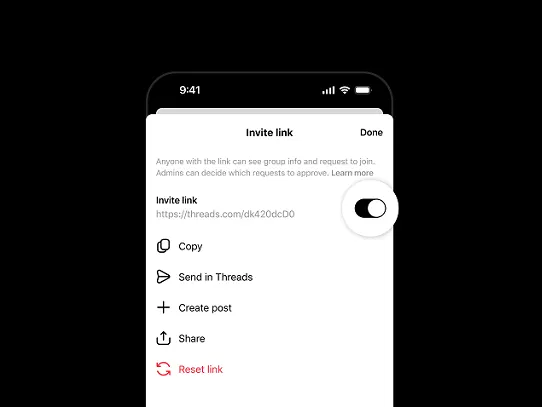
The core of this new feature lies in its simplicity and efficiency. Instead of navigating through extensive contact lists, group administrators can now access a dedicated invite link for their chats. This link acts as a direct gateway, allowing anyone with the link to request to join the group. Upon receiving a request, the group's administrators retain full control, approving each new member to ensure the community remains curated and relevant. This balance between ease of access and administrative oversight is crucial for maintaining a positive and productive environment within group discussions.
This invite system facilitates both the creation of entirely new groups and the expansion of existing ones. For instance, if you're initiating a new discussion for a specific project or event, you can set up the group and instantly generate a link. Similarly, existing groups can activate an invite link at any time, allowing them to welcome new members effortlessly. This flexibility supports various use cases, from spontaneous social gatherings to long-term collaborative projects, making Threads group chat invites a versatile tool for community engagement.
Step-by-Step Guide: Generating a Threads Group Chat Invite Link
Creating and sharing an invite link for your Threads group chat is a straightforward process designed for user convenience. The steps differ slightly depending on whether you are setting up a new group or enabling invites for an existing one. Here’s how to do it:
For a New Group Chat:
- Open Your Threads Inbox: Begin by navigating to your direct messages section within the Threads application.
- Start a New Message: Tap the icon or option to initiate a new conversation.
- Tap ‘Create Group Chat’: This option will appear as you begin a new message.
- Select ‘Create with Link’: You will then be prompted to choose how you want to create your group; select the 'Create with link' option.
- Name Your Chat: Assign a clear and descriptive name to your group chat.
- Copy the Link: Once the chat is named, the invite link will be generated, and you'll see an option to copy it directly.
For an Existing Group Chat:
- Open the Desired Group Chat: Go to the specific group conversation you wish to open for new members.
- Access the Three-Dot Menu: In the top right corner of the chat screen, tap the three-dot menu icon.
- Select ‘Invite Link’: Within the menu options, locate and tap 'Invite link.'
- Turn the Invite Link On: Activate the invite link feature if it’s not already enabled.
- Copy the Link: The system will provide the shareable link for your group chat.
It is important to remember that while group administrators are the only ones who can generate these invite links, once a link is created, any existing member can share it. However, all new members joining via the link still require approval from a group administrator, ensuring that control over group composition remains intact. This robust system helps maintain the integrity and focus of the group discussion.
Practical Applications of Threads Group Chat Invites
The utility of these simplified invite links extends across various personal and professional scenarios, fostering more connected communities:
- Community Organizers: For individuals managing events, local groups, or volunteer networks, the invite link is invaluable. Organizers can post the link on event pages or community forums, allowing interested participants to join planning discussions or receive real-time updates without manual intervention. For example, a coordinator for a local marathon can share a link for volunteers to join a chat for logistics and updates.
- Content Creators: Influencers, podcasters, and bloggers can leverage Threads group chat invites to build exclusive communities for their most engaged followers. This provides a direct channel for Q&A sessions, behind-the-scenes content, or direct feedback, strengthening the bond with their audience. A gaming streamer might offer a VIP group chat link to top subscribers for exclusive content discussions.
- Businesses and Brands: Companies can utilize group chats for customer support, product feedback, or creating niche user forums. Offering a direct link for specific product lines or support inquiries can improve customer service efficiency and foster a sense of community among users. A software company could create a beta testing group, sharing the link with select users for immediate feedback.
- Educational and Professional Collaboration: Students can quickly form study groups for specific courses, and project teams can create dedicated communication channels. The ease of inviting new members ensures that collaboration remains fluid and adaptable as team compositions change or new topics arise. A university professor could provide a group chat link for their class for collaborative project discussions.
- Personal and Social Planning: From coordinating family gatherings to planning vacations with friends, the invite link simplifies the logistics. Instead of individually messaging everyone, a single link can be shared, making sure all participants are quickly brought into the conversation.
Advantages of Simplified Group Access on Threads
The implementation of an invite link system brings several clear advantages to the Threads platform and its users:
- Increased Accessibility: Potential members can join discussions with a single click, removing barriers to participation and making groups more inclusive.
- Faster Group Growth: The ability to widely share an invite link significantly accelerates the pace at which groups can attract new members, ideal for rapidly expanding communities or event-based chats.
- Reduced Administrative Burden: Group administrators save time and effort by eliminating the need for individual invitations, allowing them to focus more on content and engagement.
- Enhanced Discovery: Links can be posted publicly or shared privately, enabling organic discovery of groups by individuals with shared interests who might not otherwise have known about them.
- Improved User Experience: The streamlined process makes interacting with communities on Threads more intuitive and user-friendly, encouraging more active participation.
The Evolution of Direct Messaging on Threads
The journey of direct messaging capabilities on Threads reflects a responsive approach to user needs and a strategic move by the platform's developers. Initially, Threads did not feature its own dedicated direct messaging system, routing users to another integrated platform for private communications. This approach, while initially part of a broader strategy for messaging integration across several applications, faced user feedback regarding the desire for native messaging within Threads.
In response, the platform introduced its own dedicated DM inbox in previous months, providing users with an in-app solution for private conversations. The subsequent addition of group chat functionality built upon this foundation, allowing multiple users to converse simultaneously. The latest update, incorporating Threads group chat invites via shareable links, represents the logical next step in this evolution. This progression demonstrates a clear commitment to developing a comprehensive and independent messaging experience, further strengthened by the platform's developers winning a significant legal case regarding app integration, which allowed for a more focused and independent development path for Threads' features.
Tips for Managing Thriving Threads Group Chats
While the invite link simplifies access, successful group chat management requires ongoing effort:
- Define a Clear Purpose: Ensure the group has a specific topic or goal to maintain focus.
- Set Community Guidelines: Establish basic rules for respectful interaction to prevent misuse and foster a positive environment.
- Encourage Participation: Pose questions, share relevant content, and actively respond to members to keep conversations lively.
- Moderate Actively: As an administrator, regularly monitor the chat to ensure adherence to guidelines and address any issues promptly.
- Utilize Admin Features: Make full use of the administrative controls, including approving new members and managing content, to keep the group productive.
Conclusion
The introduction of Threads group chat invites represents a significant enhancement to the platform's direct messaging capabilities, making it easier for users to connect, collaborate, and build communities. By simplifying the invitation process and providing administrators with essential controls, Threads is fostering a more accessible and engaging environment. This feature is a testament to the platform's ongoing development, positioning it as a robust space for meaningful group interactions and continued user growth.
