WhatsApp Activity Notes: Profile Updates for 2026
HyppeSocial November 24th, 2025 WhatsApp
In a significant update for 2026, WhatsApp is reintroducing and enhancing its "About" feature, now effectively functioning as WhatsApp Activity Notes. This improvement provides users with a more dynamic and visible way to share their current status, mimicking the popular short-form update style seen on other social platforms. Originally a core feature of the messaging app, this revamped functionality is designed to offer a quick, visible snapshot of what users are doing, making communication more efficient and engaging for personal and professional connections alike.
The reintroduction of this feature underscores a broader trend in digital communication: the need for immediate, glanceable information. WhatsApp's approach to Activity Notes prioritizes user control, visibility, and relevance, ensuring that these brief updates serve a practical purpose without overwhelming the user experience. For individuals, it's a convenient method to share their availability or current context. For businesses, it offers a novel channel for real-time customer engagement and operational transparency.
Understanding WhatsApp Activity Notes
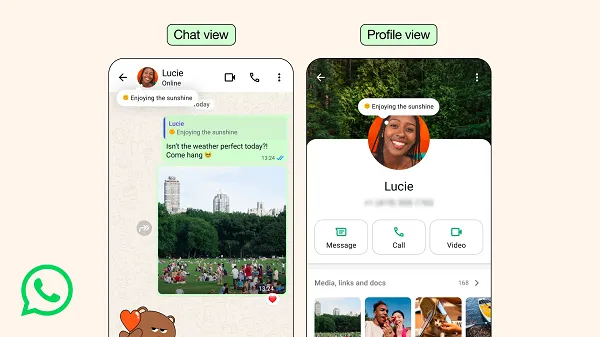
WhatsApp Activity Notes are short, temporary messages that appear prominently on a user's profile. Unlike traditional status updates, these notes are designed to be more integrated into the chat experience, appearing as a subtle bubble on the profile image within one-on-one chats. This enhanced visibility makes it easier for contacts to see what you're "up to" without actively navigating to a separate status section.
The concept behind these notes is not entirely new; the "About" section was one of WhatsApp's initial features, allowing users to briefly describe their status. However, its effectiveness waned over time. The 2026 iteration brings it back with substantial improvements, focusing on discoverability and interaction. Industry research indicates that ephemeral content and quick, actionable updates are highly favored by users, especially younger demographics. This re-engineered "About" feature directly addresses that preference, providing a familiar yet fresh way to communicate.
For example, instead of manually typing "In a meeting, will call back later" in multiple conversations, a user can simply set an activity note once, and it will be visible to their contacts. This streamlined approach saves time and ensures consistent communication across all interactions, signaling a thoughtful evolution in the platform's user experience.
How WhatsApp Activity Notes Work
The functionality of WhatsApp Activity Notes is designed for simplicity and immediate impact. When a user sets an activity note, it becomes visible on their profile picture within chat lists and individual chat screens. A small pop-up bubble associated with the profile image indicates the presence of a note, making it instantly noticeable to contacts. Tapping on this bubble allows contacts to view the full note and, crucially, to reply directly to it, fostering immediate engagement.
A key characteristic of these notes is their temporal nature. By default, an activity note expires after one day, promoting a sense of urgency and ensuring that the displayed information remains current. However, users are not restricted to this default. The feature allows for flexible expiration settings, enabling individuals to choose shorter durations for very specific, time-sensitive updates or extend them for broader, less urgent messages. This flexibility is critical for tailoring communication to various needs.
The reintroduction focuses on making these notes "more visible, timely, and easier to use," according to platform developers. This means less friction for users wanting to share a quick thought or status, and a more intuitive experience for contacts seeking that information.
Practical Applications for Personal Communication
For individual users, WhatsApp Activity Notes serve as an invaluable tool for enhancing personal communication and managing expectations. They provide a non-intrusive way to keep friends, family, and acquaintances informed about your current availability or activities without requiring direct messaging.
- Sharing Availability: Quickly inform contacts if you are "In a meeting," "At the gym," "Driving," or "Sleeping."
- Expressing Mood or Status: A simple "On vacation!" or "Enjoying the weekend" can update your entire network.
- Coordinating Plans: Notes like "Running late, be there in 10" or "Free for calls after 3 PM" can streamline day-to-day interactions.
- Celebrating Milestones: A brief "Happy Birthday to me!" or "Just finished my marathon!" offers a personal touch.
These examples illustrate how Activity Notes reduce the need for repeated explanations, allowing for more natural and less disruptive communication flows. The ability to quickly update and then have the note automatically expire or be manually removed ensures that personal information remains relevant and transient, aligning with modern communication patterns.
Leveraging Activity Notes for Businesses and Brands
Beyond personal use, WhatsApp Activity Notes present a strategic opportunity for businesses and brands to enhance their communication and customer engagement. As an increasingly popular platform for customer service and marketing, WhatsApp benefits from features that enable quick, actionable information dissemination. This new feature allows businesses to provide immediate updates without requiring customers to initiate a conversation or navigate a full profile.
- Real-time Customer Service Updates: Announce temporary changes in operating hours ("Support available 9 AM - 3 PM today"), system maintenance ("Website undergoing maintenance until 10 AM PST"), or expected response times ("Currently experiencing high volume, replies may be delayed").
- Promotional Alerts: Briefly highlight flash sales ("24-hour flash sale on XYZ products!"), new product launches ("New collection dropping soon!"), or event reminders ("Webinar starting in 15 mins!").
- Operational Transparency: Inform customers about shipping delays ("Holiday shipping deadlines approaching") or changes in service availability.
- Internal Team Communication: For businesses using WhatsApp for internal coordination, managers can share team-wide updates ("Team meeting at 11 AM in Conference Room 3") or project status ("Working on Project Alpha, please do not disturb unless urgent").
The ability for contacts to reply directly to a note adds another layer of engagement, allowing customers to quickly inquire about an update or promotion. This direct interaction can significantly improve customer satisfaction and conversion rates by making information more accessible and actionable.
Setting Up Your WhatsApp Activity Note
Implementing your first WhatsApp Activity Note is a straightforward process, designed to be intuitive for all users. The platform has prioritized ease of access for this re-introduced feature.
- Open the WhatsApp application on your smartphone.
- Navigate to the 'Settings' menu. This is typically found by tapping the three dots (Android) or the 'Settings' icon (iOS) in the bottom right corner.
- Within Settings, look for your profile information, usually at the top, displaying your name and current 'About' status.
- Tap on your current 'About' status or a dedicated 'Set About' option if available.
- Compose your desired activity note. Keep it concise and clear, as space is limited.
- Set the expiration timer for your note. You can choose the default one-day expiry or customize it for shorter or longer durations based on your need.
- Review your privacy settings to ensure the note is visible only to your intended audience (e.g., 'My Contacts,' 'My Contacts Except...', or 'Nobody').
- Confirm and save your changes. Your activity note will now be live on your profile.
This simple setup process means users can quickly adapt to the new feature, integrating it seamlessly into their daily communication habits.
Controlling Visibility and Expiration
One of the strengths of the updated Activity Notes feature is the robust control users have over who sees their messages and for how long. Privacy and relevance are paramount in digital communication, and WhatsApp has addressed these concerns directly.
Users can select from several privacy options for their notes:
- My Contacts: The note is visible to everyone in your phone's address book who also uses WhatsApp. This is often the default setting and suitable for most personal updates.
- My Contacts Except...: This option allows you to exclude specific individuals from seeing your activity note. This is useful for situations where an update might not be relevant or appropriate for certain contacts.
- Nobody: While counterintuitive for an activity note, this option ensures maximum privacy, making the note visible to no one. It effectively allows you to draft a note without publishing it immediately.
Regarding expiration, the default 24-hour window is ideal for most day-to-day updates. However, for specific events or longer-term announcements, users can adjust this timer to last for a few hours, several days, or even a week. This flexibility prevents outdated information from lingering on profiles and ensures that communications remain timely and accurate. This level of control empowers users and businesses to manage their online presence effectively and thoughtfully.
Strategic Use of Short-Form Updates
The reintroduction of WhatsApp Activity Notes aligns with a broader industry trend towards short-form, ephemeral content. Platforms are increasingly recognizing the value of quick, digestible updates that cater to users' limited attention spans and fast-paced digital lives. These notes facilitate an "at-a-glance" communication style, where information can be absorbed with minimal effort.
For individuals, this means less time crafting elaborate messages and more time connecting authentically. For businesses, it translates into a powerful tool for rapid communication in scenarios where every second counts, such as critical alerts, flash promotions, or immediate customer service announcements. Experts suggest that integrating such concise update features into a comprehensive communication strategy can significantly boost engagement and responsiveness.
By leveraging Activity Notes strategically, users can ensure their presence on WhatsApp is dynamic and relevant, fostering clearer communication and stronger connections in 2026 and beyond.
